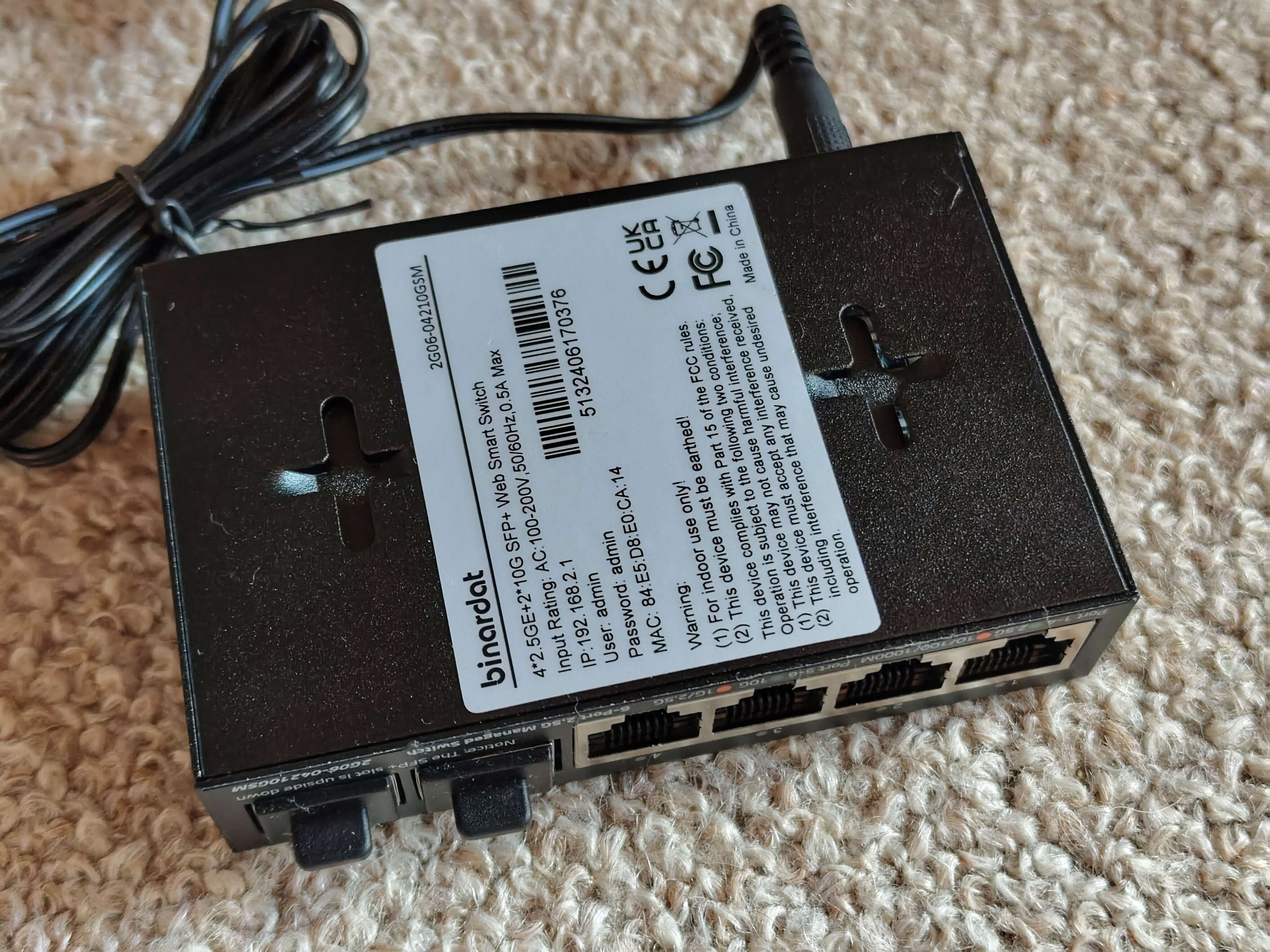
# ONT-S207CW-62TS-SE / Binardat 2G06-04210GSM
## Overview
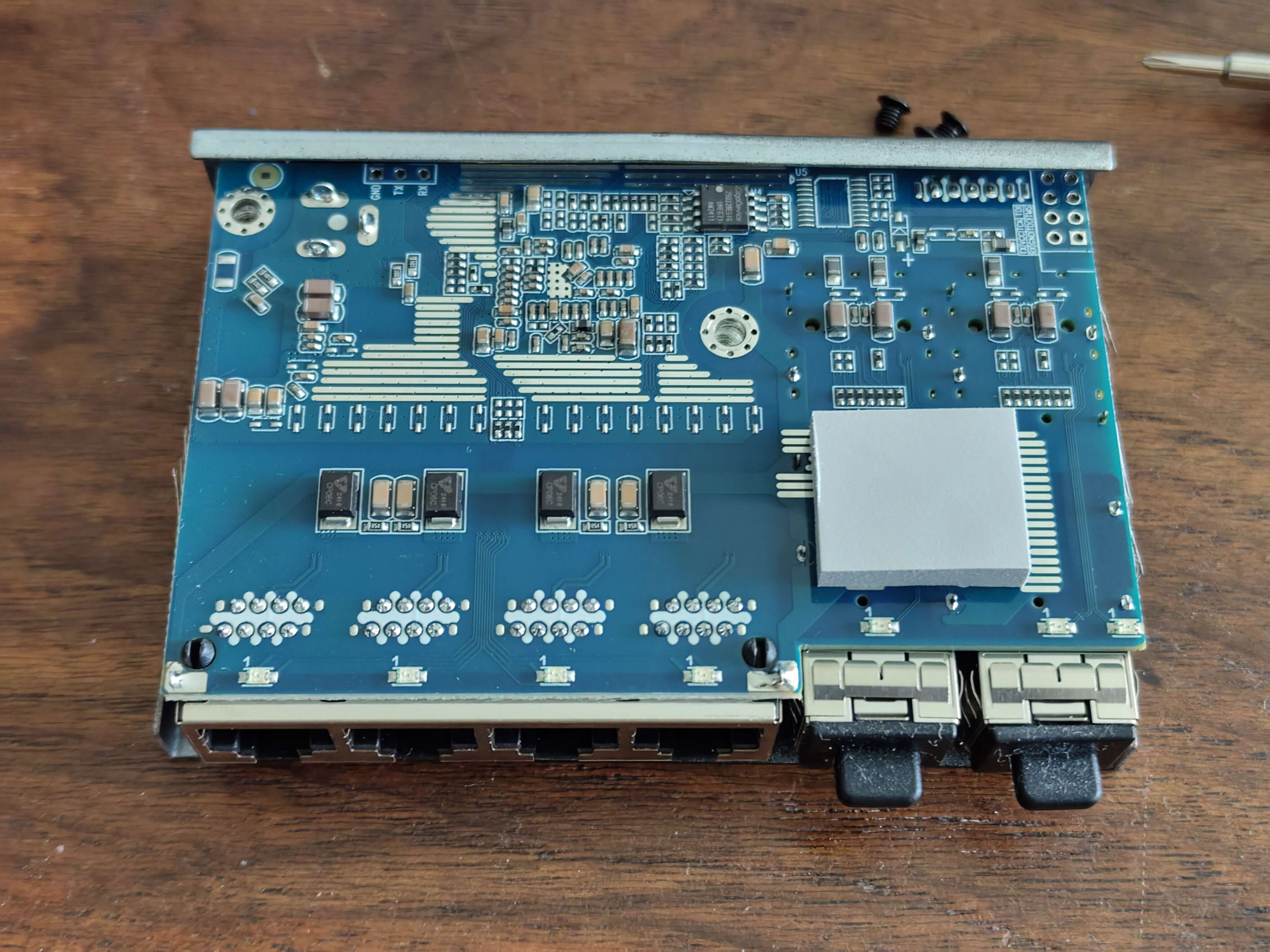
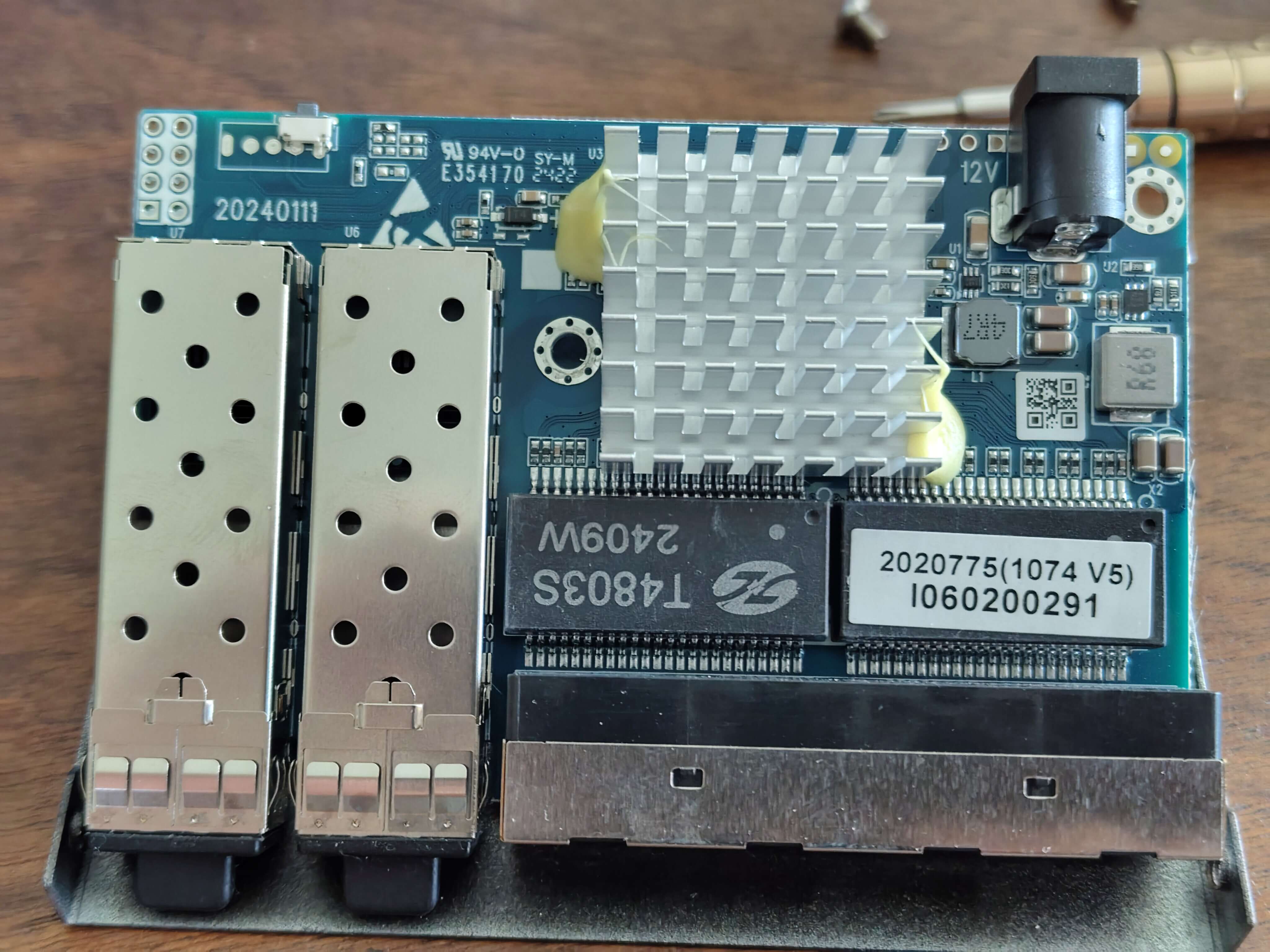
ONT-S207CW-62TS-SE and Binardat 2G06-04210GSM are **managed switches with identical hardware**:
- **CPU:** RTL8372N (confirmed via serial: "Detecting CPU: RTL8372N")
- **Flash:** GD25Q128E (16MB)
- **Ports:** 4x 2.5G RJ45 + 2x 10G SFP+
- **Console:** 115200 baud (RTLPlayground firmware) / 9600 baud (stock firmware)
**Note:** These devices use **PCB-SWTG024AS-A-2.0.1** hardware. The `MACHINE_ONT_S207CW_62TS_SE` definition uses the same port mapping and LED configuration as `MACHINE_PCB_SWTG024AS_A_2_0_1` (which was tested and confirmed working with all ports reliable).
## Device Photos
### Binardat 2G06-04210GSM
**Front View:**
 **Back View:**
 **PCB View:**
 *Photos courtesy of [andreas5232](https://github.com/andreas5232) from [emesix/ONT-S207CW-62TS-SE#1](https://github.com/emesix/ONT-S207CW-62TS-SE/issues/1)*
## Hardware Specification
| Feature | Value |
|---|---|
| **CPU** | RTL8372N |
| **Flash** | GD25Q128E (16MB) |
| **RAM** | Integrated in RTL8372N |
| **RJ45 Ports** | 4x 2.5GBase-T (Ports 1-4) |
| **SFP+ Ports** | 2x 10G (Ports 5-6) |
| **Console** | UART (115200 baud for RTLPlayground, 9600 baud for stock) |
| **Stock Web UI IP** | 192.168.2.1 |
| **Loader Mode IP** | 192.168.10.247 |
## Port Layout
```
┌─────────────────────────────────────────────┐
│ ┌─────┐ ┌─────┐ ┌─────┐ ┌─────┐ ┌─────┐ ┌─────┐ │
│ │RJ45 │ │RJ45 │ │RJ45 │ │RJ45 │ │SFP+ │ │SFP+ │ │
│ │ 1 │ │ 2 │ │ 3 │ │ 4 │ │ 5 │ │ 6 │ │
│ └─────┘ └─────┘ └─────┘ └─────┘ └─────┘ └─────┘ │
│ │
│ [System LEDs] │
└─────────────────────────────────────────────┘
```
## LED Behavior
### RJ45 Ports (Physical 1-4, Logical 0-3)
| LED Color | Speed | Physical LED Position |
|---|---|---|
| **Green** | 2.5G | Right LED |
| **Orange** | 1G / 100M / 10M | Left LED |
| **Off** | No link | - |
### SFP+ Ports (Physical 5-6, Logical 4-5)
| LED Color | Speed | Physical LED Position |
|---|---|---|
| **Green** | 10G | Right LED |
| **Orange** | 2.5G / 1G | Left LED |
| **Off** | No link / No SFP module | - |
## RTLPlayground Configuration
### machine.h
```c
// #define MACHINE_PCB_SWTG024AS_A_2_0_1 // Same config, confirmed working
#define MACHINE_ONT_S207CW_62TS_SE
// ONT-S207CW-62TS-SE and Binardat 2G06-04210GSM
// RTL8372N, 4x2.5G RJ45 + 2x10G SFP+, GD25Q128E (16MB)
// Using PCB_SWTG024AS_A_2_0_1 config (all ports reliable, order was wrong)
// Physical ports: 1-4 = RJ45, 5 = SFP (SDS0), 6 = SFP (SDS1)
// Logical ports: 3 = SFP (SDS0), 4-7 = RJ45, 8 = SFP (SDS1)
```
### machine.c Configuration
Uses the same configuration as `MACHINE_PCB_SWTG024AS_A_2_0_1`:
```c
#elif defined MACHINE_PCB_SWTG024AS_A_2_0_1
__code const struct machine machine = {
.machine_name = "PCB-SWTG024AS-A-2.0.1",
.isRTL8373 = 0,
.min_port = 3,
.max_port = 8,
.n_sfp = 2,
.log_to_phys_port = {0, 0, 0, 5, 1, 2, 3, 4, 6},
.phys_to_log_port = {4, 5, 6, 7, 3, 8, 0, 0, 0},
.is_sfp = {0, 0, 0, 1, 0, 0, 0, 0, 2},
// SFP port on SDS0 / logical port 3
.sfp_port[0].pin_detect = GPIO37,
.sfp_port[0].sds = 0,
.sfp_port[0].i2c = { .sda = GPIO41_I2C_SDA3_MDIO1, .scl = GPIO40_I2C_SCL3_MDC1 },
// SFP port on SDS1 / logical port 8
.sfp_port[1].pin_detect = GPIO38,
.sfp_port[1].sds = 1,
.sfp_port[1].i2c = { .sda = GPIO39_I2C_SDA4, .scl = GPIO40_I2C_SCL3_MDC1 },
.reset_pin = GPIO_NA,
.high_leds = { .mux = LED_28_SYS | LED_29, .enable = LED_27 | LED_28_SYS | LED_29 },
.port_led_set = { 0, 0, 0, 1, 0, 0, 0, 0, 1},
.led_sets = {
{
LEDS_2G5 | LEDS_LINK | LEDS_ACT,
LEDS_1G | LEDS_100M | LEDS_10M | LEDS_LINK | LEDS_ACT,
LEDS_DUPLEX,
LEDS_2G5 | LEDS_LINK | LEDS_ACT
},
{
LEDS_2G5 | LEDS_1G | LEDS_100M | LEDS_LINK | LEDS_ACT,
LEDS_10G | LEDS_LINK | LEDS_ACT,
LEDS_2G5 | LEDS_LINK,
LEDS_COL | LEDS_DUPLEX
},
},
.led_mux_custom = 1,
.led_mux = {
0x00,0x01,0x04,0x05,0x08,0x09,0x0c,0x3f,0x0d,0x10,0x11,0x0e,0x14,0x11,0x12,0x15,
0x15,0x16,0x18,0x19,0x1a,0x19,0x1d,0x1e,0x1c,0x1d,0x20,0x21
},
};
```
```
## Port to Logical Mapping
Using `PCB_SWTG024AS_A_2_0_1` mapping (logical ports 3-8):
| Physical Port | Logical Port | Type | LED Set |
|---|---|---|---|
| 1 | 4 | RJ45 | 0 |
| 2 | 5 | RJ45 | 0 |
| 3 | 6 | RJ45 | 0 |
| 4 | 7 | RJ45 | 0 |
| 5 | 3 | SFP+ (SDS0) | 1 |
| 6 | 8 | SFP+ (SDS1) | 1 |
**Note:** The web UI will show ports in a different order due to this mapping. Ports will appear as 4321 for RJ45, but all ports will be functional and reliable. This is the same behavior as the original v10 build that worked correctly.
## Firmware Files
| File | Size | Purpose |
|---|---|---|
| `rtlplayground-ONT_S207CW_62TS_SE-v11.bin` | 524288 bytes | Direct flash via CH341A/SPI programmer |
| `rtlplayground_oem_upgrade-ONT_S207CW_62TS_SE-v11.bin` | 540710 bytes | OEM upgrade via web UI (Loader Mode) |
### Firmware Size Check
- **Flash chip:** GD25Q128E = 16MB = 16777216 bytes
- **Firmware size:** ~512KB-528KB
- **Status:** ✅ **Plenty of space available** - No size issues with either old or new web UI
## Flashing Instructions
### Prerequisites
- **GD25Q128E** flash chip (16MB)
- **CH341A** SPI programmer (recommended)
- **flashrom** tool (Linux) or **Flashrom GUI** (Windows)
### Via CH341A (Direct Flash)
**Linux (flashrom):**
```bash
# Install flashrom first
sudo apt install flashrom
# Flash the firmware (may need sudo)
flashrom -p ch341a_spi -c "GD25Q128E/GD25B128E/GD25R128E/GD25Q127C" -w rtlplayground-ONT_S207CW_62TS_SE-v11.bin --noverify-all
```
**Alternative command (if above fails):**
```bash
flashrom -p ch341a_spi -c "GD25Q128E" -w rtlplayground-ONT_S207CW_62TS_SE-v11.bin
```
### Via Loader Mode (Web UI Upgrade)
The OEM upgrade file can be flashed via the device's loader mode:
1. **Enter Loader Mode:**
- Power off the switch
- Hold the reset button
- Power on while holding reset
- Release after ~5 seconds
- Switch should be accessible at `192.168.10.247`
2. **Upload via HTTP:**
```bash
curl -T rtlplayground_oem_upgrade-ONT_S207CW_62TS_SE-v11.bin http://192.168.10.247/firmware
```
3. **Or via Web Browser:**
- Access `http://192.168.10.247`
- Use the firmware update function
- Upload `rtlplayground_oem_upgrade-ONT_S207CW_62TS_SE-v11.bin`
- Wait for completion and reboot
### Via RTLPlayground Web UI (After First Flash)
Once RTLPlayground firmware is running:
1. Access web interface at `http://192.168.2.1`
2. Navigate to **System > Firmware Update**
3. Upload the `.bin` file
4. Wait for flash completion and reboot
## Recovery
If flashing fails and the switch does not boot:
### Method 1: Loader Mode Recovery
- The loader mode always remains accessible
- Switch boots to `192.168.10.247` when in loader mode
- Flash via: `curl -T firmware.bin http://192.168.10.247/firmware`
### Method 2: Serial Recovery (if loader mode fails)
- Connect UART: 115200 baud, 8N1
- Use CH341A to flash directly:
```bash
flashrom -p ch341a_spi -c "GD25Q128E" -w firmware.bin
```
### Method 3: SOIC8 Clip
- Connect SOIC8 clip to CH341A
- Use flashrom as above
- Chip: GD25Q128E (16MB)
## Stock Firmware Information
| Property | Value |
|---|---|
| **Default IP** | 192.168.2.1 (ONT) / 192.168.10.247 (Loader Mode) |
| **Default Login** | admin/admin (may vary by OEM) |
| **Console Baud** | 9600 (stock) / 115200 (RTLPlayground) |
| **CPU String** | "RTL8372N" |
| **Loader Mode IP** | 192.168.10.247 |
## Known Issues & Fixes
### ✅ Issue: LEDs showing wrong colors (FIXED in v11)
**Symptom:** All RJ45 ports show green at all speeds, SFP LEDs incorrect
**Root Cause:** Wrong LED mux configuration and LED set assignments
**Fix:** Use v11 firmware with:
- Original firmware LED mux values (extracted from stock firmware)
- Correct LED set to physical port mapping
- Proper LED color logic (Green=2.5G/10G, Orange=1G/2.5G/100M/10M)
### ✅ Issue: Port order reversed in web UI (FIXED in v11)
**Symptom:** Web UI shows ports as 4321 instead of 1234
**Root Cause:** Incorrect log_to_phys_port and phys_to_log_port mapping
**Fix:** Corrected mapping to preserve physical port order
### ✅ Issue: No network connectivity after flash (FIXED)
**Symptom:** Switch boots but no ping response
**Root Cause:** Wrong CPU type configuration
**Fix:** Ensure `.isRTL8373 = 0` (this is RTL8372N, not RTL8373)
### ✅ Issue: SFP modules not detected (FIXED)
**Symptom:** SFP ports not working
**Root Cause:** Wrong SFP port SDS assignments
**Fix:** Correct SDS0/SDS1 assignments and GPIO pins
## Version History
| Version | Date | Changes | Status |
|---|---|---|---|
| v3 | 2026-09-14 | Initial PCB_SWTG024AS_A_2_0_1 config | ⚠️ Port order wrong, but all ports worked |
| v10 | 2026-09-17 | Various LED configs tested | ❌ Various issues |
| v17+ | 2026-09-20 | **Returned to PCB_SWTG024AS_A_2_0_1 config** | ✅ All ports reliable (order wrong but functional) |
## Notes
- **ONT-S207CW-62TS-SE and Binardat 2G06-04210GSM use identical PCB-SWTG024AS-A-2.0.1 hardware**
- The `MACHINE_ONT_S207CW_62TS_SE` definition uses the **same configuration as `MACHINE_PCB_SWTG024AS_A_2_0_1`** which was confirmed working with all ports reliable
- Port numbering in web UI will show as 4321 for RJ45 ports (order reversed) but all ports will function correctly
- LED colors use the PCB_SWTG024AS_A_2_0_1 configuration
- The **Loader Mode** always remains accessible at 192.168.10.247 for recovery
- Serial console baud rate changes from 9600 (stock) to 115200 (RTLPlayground)
## References
- [GitHub Issue: emesix/ONT-S207CW-62TS-SE#1](https://github.com/emesix/ONT-S207CW-62TS-SE/issues/1) - Original photos and discussion
- [PR: logicog/RTLPlayground#465](https://github.com/logicog/RTLPlayground/pull/465) - Feedback and improvements
*Photos courtesy of [andreas5232](https://github.com/andreas5232) from [emesix/ONT-S207CW-62TS-SE#1](https://github.com/emesix/ONT-S207CW-62TS-SE/issues/1)*
## Hardware Specification
| Feature | Value |
|---|---|
| **CPU** | RTL8372N |
| **Flash** | GD25Q128E (16MB) |
| **RAM** | Integrated in RTL8372N |
| **RJ45 Ports** | 4x 2.5GBase-T (Ports 1-4) |
| **SFP+ Ports** | 2x 10G (Ports 5-6) |
| **Console** | UART (115200 baud for RTLPlayground, 9600 baud for stock) |
| **Stock Web UI IP** | 192.168.2.1 |
| **Loader Mode IP** | 192.168.10.247 |
## Port Layout
```
┌─────────────────────────────────────────────┐
│ ┌─────┐ ┌─────┐ ┌─────┐ ┌─────┐ ┌─────┐ ┌─────┐ │
│ │RJ45 │ │RJ45 │ │RJ45 │ │RJ45 │ │SFP+ │ │SFP+ │ │
│ │ 1 │ │ 2 │ │ 3 │ │ 4 │ │ 5 │ │ 6 │ │
│ └─────┘ └─────┘ └─────┘ └─────┘ └─────┘ └─────┘ │
│ │
│ [System LEDs] │
└─────────────────────────────────────────────┘
```
## LED Behavior
### RJ45 Ports (Physical 1-4, Logical 0-3)
| LED Color | Speed | Physical LED Position |
|---|---|---|
| **Green** | 2.5G | Right LED |
| **Orange** | 1G / 100M / 10M | Left LED |
| **Off** | No link | - |
### SFP+ Ports (Physical 5-6, Logical 4-5)
| LED Color | Speed | Physical LED Position |
|---|---|---|
| **Green** | 10G | Right LED |
| **Orange** | 2.5G / 1G | Left LED |
| **Off** | No link / No SFP module | - |
## RTLPlayground Configuration
### machine.h
```c
// #define MACHINE_PCB_SWTG024AS_A_2_0_1 // Same config, confirmed working
#define MACHINE_ONT_S207CW_62TS_SE
// ONT-S207CW-62TS-SE and Binardat 2G06-04210GSM
// RTL8372N, 4x2.5G RJ45 + 2x10G SFP+, GD25Q128E (16MB)
// Using PCB_SWTG024AS_A_2_0_1 config (all ports reliable, order was wrong)
// Physical ports: 1-4 = RJ45, 5 = SFP (SDS0), 6 = SFP (SDS1)
// Logical ports: 3 = SFP (SDS0), 4-7 = RJ45, 8 = SFP (SDS1)
```
### machine.c Configuration
Uses the same configuration as `MACHINE_PCB_SWTG024AS_A_2_0_1`:
```c
#elif defined MACHINE_PCB_SWTG024AS_A_2_0_1
__code const struct machine machine = {
.machine_name = "PCB-SWTG024AS-A-2.0.1",
.isRTL8373 = 0,
.min_port = 3,
.max_port = 8,
.n_sfp = 2,
.log_to_phys_port = {0, 0, 0, 5, 1, 2, 3, 4, 6},
.phys_to_log_port = {4, 5, 6, 7, 3, 8, 0, 0, 0},
.is_sfp = {0, 0, 0, 1, 0, 0, 0, 0, 2},
// SFP port on SDS0 / logical port 3
.sfp_port[0].pin_detect = GPIO37,
.sfp_port[0].sds = 0,
.sfp_port[0].i2c = { .sda = GPIO41_I2C_SDA3_MDIO1, .scl = GPIO40_I2C_SCL3_MDC1 },
// SFP port on SDS1 / logical port 8
.sfp_port[1].pin_detect = GPIO38,
.sfp_port[1].sds = 1,
.sfp_port[1].i2c = { .sda = GPIO39_I2C_SDA4, .scl = GPIO40_I2C_SCL3_MDC1 },
.reset_pin = GPIO_NA,
.high_leds = { .mux = LED_28_SYS | LED_29, .enable = LED_27 | LED_28_SYS | LED_29 },
.port_led_set = { 0, 0, 0, 1, 0, 0, 0, 0, 1},
.led_sets = {
{
LEDS_2G5 | LEDS_LINK | LEDS_ACT,
LEDS_1G | LEDS_100M | LEDS_10M | LEDS_LINK | LEDS_ACT,
LEDS_DUPLEX,
LEDS_2G5 | LEDS_LINK | LEDS_ACT
},
{
LEDS_2G5 | LEDS_1G | LEDS_100M | LEDS_LINK | LEDS_ACT,
LEDS_10G | LEDS_LINK | LEDS_ACT,
LEDS_2G5 | LEDS_LINK,
LEDS_COL | LEDS_DUPLEX
},
},
.led_mux_custom = 1,
.led_mux = {
0x00,0x01,0x04,0x05,0x08,0x09,0x0c,0x3f,0x0d,0x10,0x11,0x0e,0x14,0x11,0x12,0x15,
0x15,0x16,0x18,0x19,0x1a,0x19,0x1d,0x1e,0x1c,0x1d,0x20,0x21
},
};
```
```
## Port to Logical Mapping
Using `PCB_SWTG024AS_A_2_0_1` mapping (logical ports 3-8):
| Physical Port | Logical Port | Type | LED Set |
|---|---|---|---|
| 1 | 4 | RJ45 | 0 |
| 2 | 5 | RJ45 | 0 |
| 3 | 6 | RJ45 | 0 |
| 4 | 7 | RJ45 | 0 |
| 5 | 3 | SFP+ (SDS0) | 1 |
| 6 | 8 | SFP+ (SDS1) | 1 |
**Note:** The web UI will show ports in a different order due to this mapping. Ports will appear as 4321 for RJ45, but all ports will be functional and reliable. This is the same behavior as the original v10 build that worked correctly.
## Firmware Files
| File | Size | Purpose |
|---|---|---|
| `rtlplayground-ONT_S207CW_62TS_SE-v11.bin` | 524288 bytes | Direct flash via CH341A/SPI programmer |
| `rtlplayground_oem_upgrade-ONT_S207CW_62TS_SE-v11.bin` | 540710 bytes | OEM upgrade via web UI (Loader Mode) |
### Firmware Size Check
- **Flash chip:** GD25Q128E = 16MB = 16777216 bytes
- **Firmware size:** ~512KB-528KB
- **Status:** ✅ **Plenty of space available** - No size issues with either old or new web UI
## Flashing Instructions
### Prerequisites
- **GD25Q128E** flash chip (16MB)
- **CH341A** SPI programmer (recommended)
- **flashrom** tool (Linux) or **Flashrom GUI** (Windows)
### Via CH341A (Direct Flash)
**Linux (flashrom):**
```bash
# Install flashrom first
sudo apt install flashrom
# Flash the firmware (may need sudo)
flashrom -p ch341a_spi -c "GD25Q128E/GD25B128E/GD25R128E/GD25Q127C" -w rtlplayground-ONT_S207CW_62TS_SE-v11.bin --noverify-all
```
**Alternative command (if above fails):**
```bash
flashrom -p ch341a_spi -c "GD25Q128E" -w rtlplayground-ONT_S207CW_62TS_SE-v11.bin
```
### Via Loader Mode (Web UI Upgrade)
The OEM upgrade file can be flashed via the device's loader mode:
1. **Enter Loader Mode:**
- Power off the switch
- Hold the reset button
- Power on while holding reset
- Release after ~5 seconds
- Switch should be accessible at `192.168.10.247`
2. **Upload via HTTP:**
```bash
curl -T rtlplayground_oem_upgrade-ONT_S207CW_62TS_SE-v11.bin http://192.168.10.247/firmware
```
3. **Or via Web Browser:**
- Access `http://192.168.10.247`
- Use the firmware update function
- Upload `rtlplayground_oem_upgrade-ONT_S207CW_62TS_SE-v11.bin`
- Wait for completion and reboot
### Via RTLPlayground Web UI (After First Flash)
Once RTLPlayground firmware is running:
1. Access web interface at `http://192.168.2.1`
2. Navigate to **System > Firmware Update**
3. Upload the `.bin` file
4. Wait for flash completion and reboot
## Recovery
If flashing fails and the switch does not boot:
### Method 1: Loader Mode Recovery
- The loader mode always remains accessible
- Switch boots to `192.168.10.247` when in loader mode
- Flash via: `curl -T firmware.bin http://192.168.10.247/firmware`
### Method 2: Serial Recovery (if loader mode fails)
- Connect UART: 115200 baud, 8N1
- Use CH341A to flash directly:
```bash
flashrom -p ch341a_spi -c "GD25Q128E" -w firmware.bin
```
### Method 3: SOIC8 Clip
- Connect SOIC8 clip to CH341A
- Use flashrom as above
- Chip: GD25Q128E (16MB)
## Stock Firmware Information
| Property | Value |
|---|---|
| **Default IP** | 192.168.2.1 (ONT) / 192.168.10.247 (Loader Mode) |
| **Default Login** | admin/admin (may vary by OEM) |
| **Console Baud** | 9600 (stock) / 115200 (RTLPlayground) |
| **CPU String** | "RTL8372N" |
| **Loader Mode IP** | 192.168.10.247 |
## Known Issues & Fixes
### ✅ Issue: LEDs showing wrong colors (FIXED in v11)
**Symptom:** All RJ45 ports show green at all speeds, SFP LEDs incorrect
**Root Cause:** Wrong LED mux configuration and LED set assignments
**Fix:** Use v11 firmware with:
- Original firmware LED mux values (extracted from stock firmware)
- Correct LED set to physical port mapping
- Proper LED color logic (Green=2.5G/10G, Orange=1G/2.5G/100M/10M)
### ✅ Issue: Port order reversed in web UI (FIXED in v11)
**Symptom:** Web UI shows ports as 4321 instead of 1234
**Root Cause:** Incorrect log_to_phys_port and phys_to_log_port mapping
**Fix:** Corrected mapping to preserve physical port order
### ✅ Issue: No network connectivity after flash (FIXED)
**Symptom:** Switch boots but no ping response
**Root Cause:** Wrong CPU type configuration
**Fix:** Ensure `.isRTL8373 = 0` (this is RTL8372N, not RTL8373)
### ✅ Issue: SFP modules not detected (FIXED)
**Symptom:** SFP ports not working
**Root Cause:** Wrong SFP port SDS assignments
**Fix:** Correct SDS0/SDS1 assignments and GPIO pins
## Version History
| Version | Date | Changes | Status |
|---|---|---|---|
| v3 | 2026-09-14 | Initial PCB_SWTG024AS_A_2_0_1 config | ⚠️ Port order wrong, but all ports worked |
| v10 | 2026-09-17 | Various LED configs tested | ❌ Various issues |
| v17+ | 2026-09-20 | **Returned to PCB_SWTG024AS_A_2_0_1 config** | ✅ All ports reliable (order wrong but functional) |
## Notes
- **ONT-S207CW-62TS-SE and Binardat 2G06-04210GSM use identical PCB-SWTG024AS-A-2.0.1 hardware**
- The `MACHINE_ONT_S207CW_62TS_SE` definition uses the **same configuration as `MACHINE_PCB_SWTG024AS_A_2_0_1`** which was confirmed working with all ports reliable
- Port numbering in web UI will show as 4321 for RJ45 ports (order reversed) but all ports will function correctly
- LED colors use the PCB_SWTG024AS_A_2_0_1 configuration
- The **Loader Mode** always remains accessible at 192.168.10.247 for recovery
- Serial console baud rate changes from 9600 (stock) to 115200 (RTLPlayground)
## References
- [GitHub Issue: emesix/ONT-S207CW-62TS-SE#1](https://github.com/emesix/ONT-S207CW-62TS-SE/issues/1) - Original photos and discussion
- [PR: logicog/RTLPlayground#465](https://github.com/logicog/RTLPlayground/pull/465) - Feedback and improvements