# ONT-S207CW-62TS-SE / Binardat 2G06-04210GSM / Binardat 2G06-04210GS
## Overview
ONT-S207CW-62TS-SE, Binardat 2G06-04210GSM (managed), and Binardat 2G06-04210GS (unmanaged) are **switches with identical hardware**:
- **CPU:** RTL8372N (confirmed via serial: "Detecting CPU: RTL8372N")
- **Flash:** GD25Q128E (16MB)
- **Ports:** 4x 2.5G RJ45 + 2x 10G SFP+
- **Console:** 115200 baud (RTLPlayground firmware) / 9600 baud (stock firmware)
**Note:** These devices are **RTL8372N-based** with **LAN ports mounted upside-down on the PCB**, requiring a custom configuration. The `MACHINE_ONT_S207CW_62TS_SE` definition uses a **custom configuration** with:
- Corrected port mapping (physical ports 1-4 = RJ45, 5-6 = SFP)
- Optimized LED sets for different port wiring (RJ45 Ports 1-2 have reversed LED wiring)
- Custom LED mux configuration
## Device Photos
### Binardat 2G06-04210GSM
**Front View:**
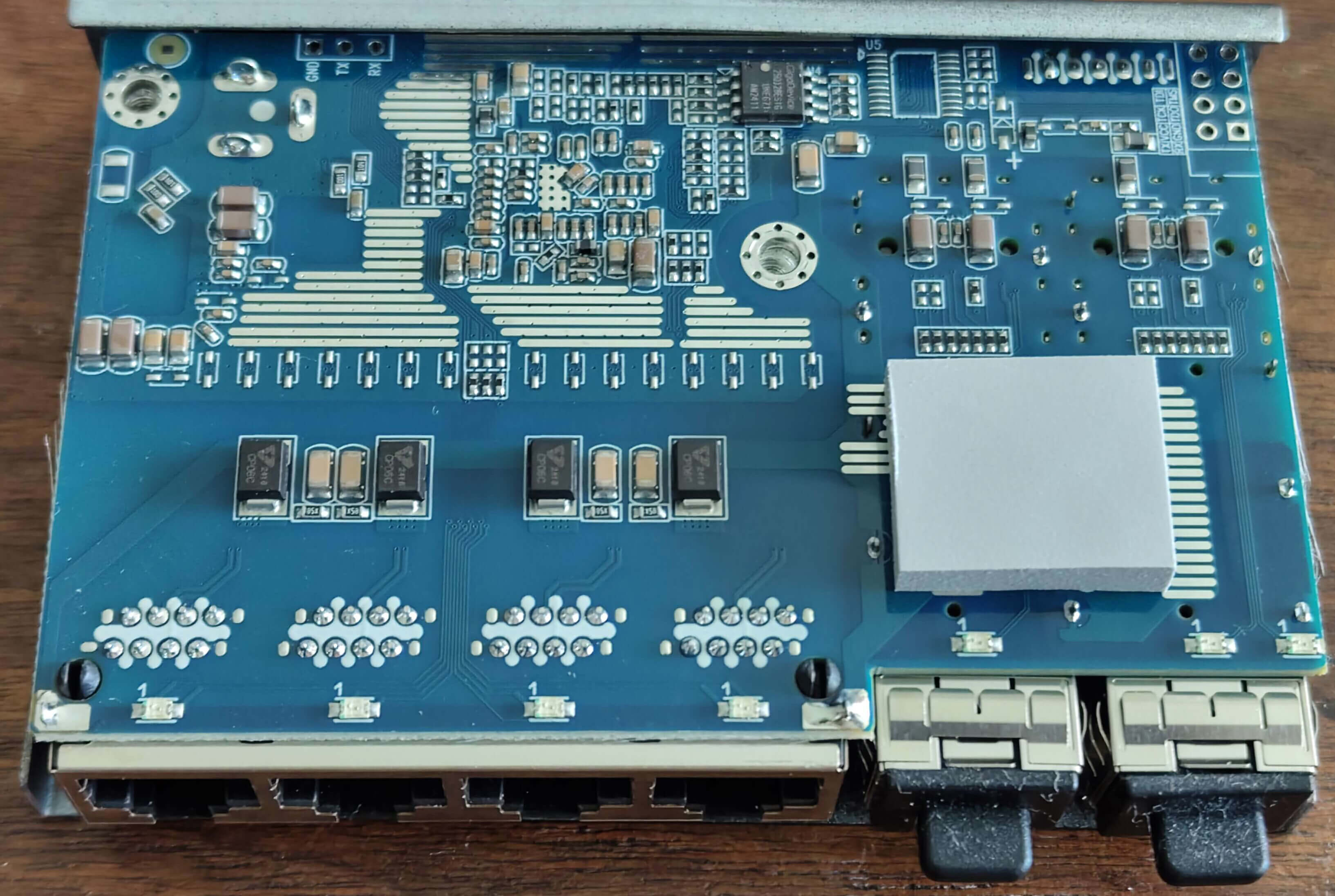 **Back View:**
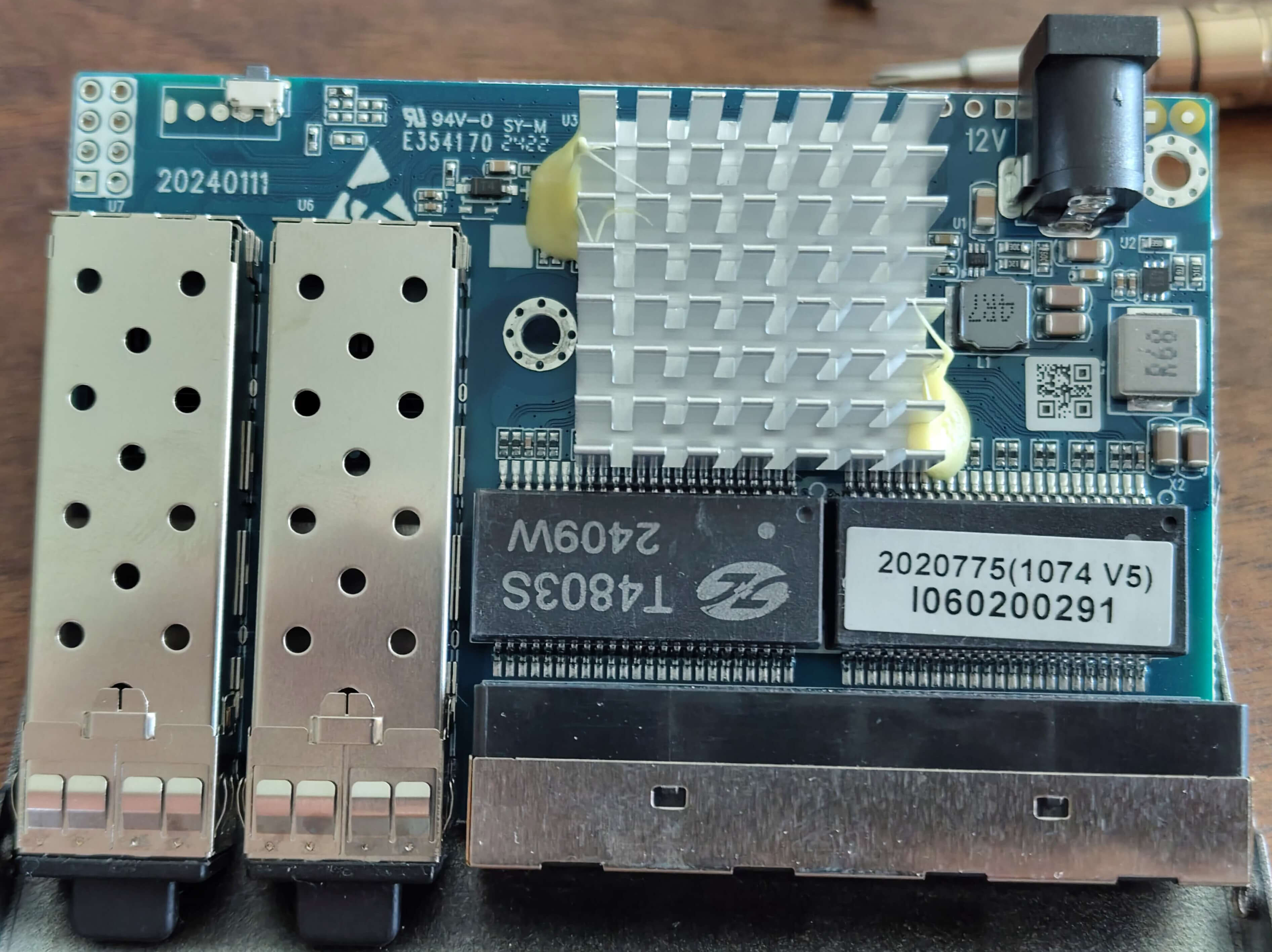 **PCB View:**
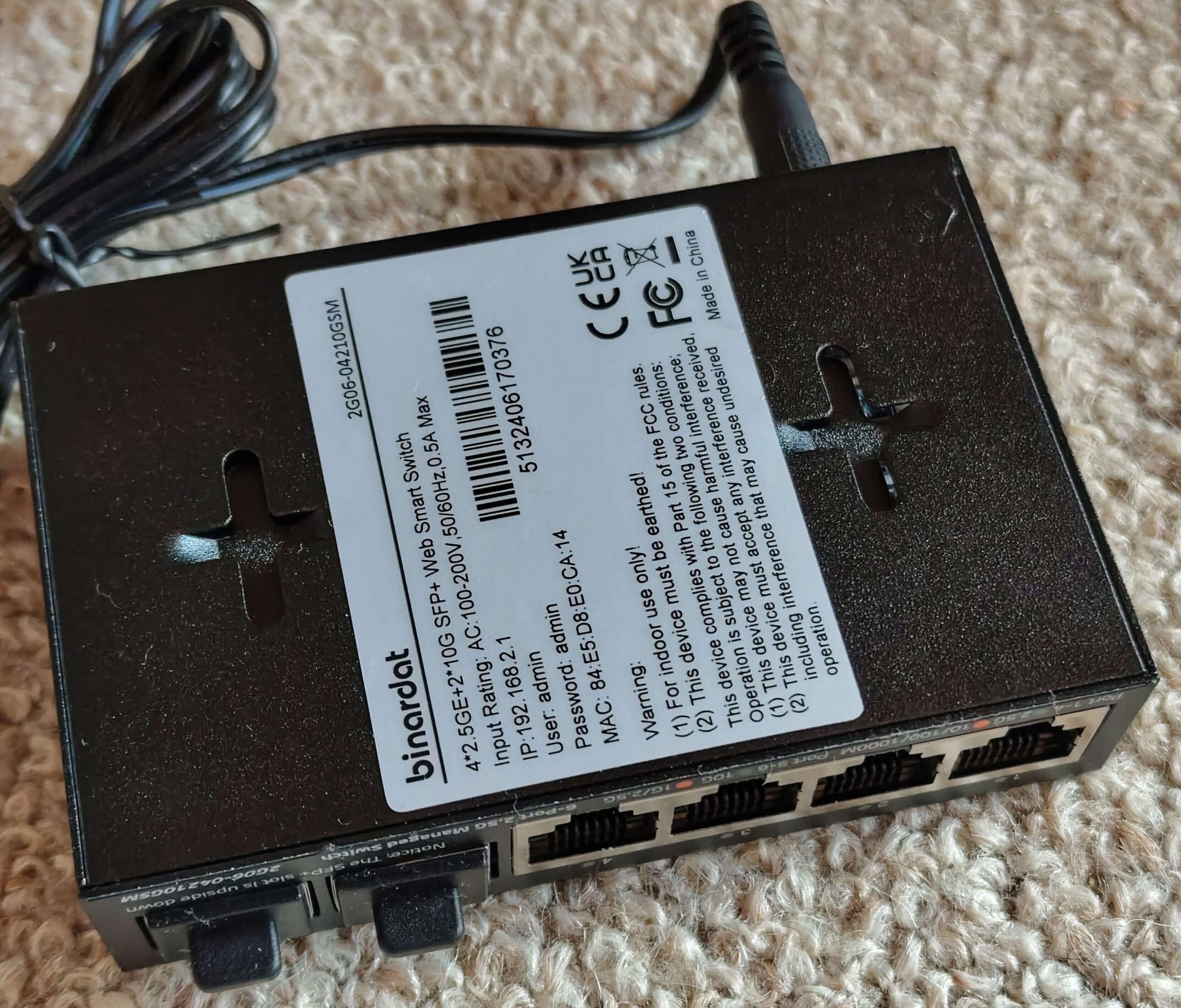 *Photos courtesy of [andreas5232](https://github.com/andreas5232) from [emesix/ONT-S207CW-62TS-SE#1](https://github.com/emesix/ONT-S207CW-62TS-SE/issues/1)*
## Hardware Specification
| Feature | Value |
|---|---|
| **CPU** | RTL8372N |
| **Flash** | GD25Q128E (16MB) |
| **RAM** | Integrated in RTL8372N |
| **RJ45 Ports** | 4x 2.5GBase-T (Ports 1-4) |
| **SFP+ Ports** | 2x 10G (Ports 5-6) |
| **Console** | UART (115200 baud for RTLPlayground, 9600 baud for stock) |
| **Stock Web UI IP** | 192.168.2.1 |
| **Loader Mode IP** | 192.168.10.247 |
## Port Layout
```
┌─────────────────────────────────────────────┐
│ ┌─────┐ ┌─────┐ ┌─────┐ ┌─────┐ ┌─────┐ ┌─────┐ │
│ │RJ45 │ │RJ45 │ │RJ45 │ │RJ45 │ │SFP+ │ │SFP+ │ │
│ │ 1 │ │ 2 │ │ 3 │ │ 4 │ │ 5 │ │ 6 │ │
│ └─────┘ └─────┘ └─────┘ └─────┘ └─────┘ └─────┘ │
│ │
│ [System LEDs] │
└─────────────────────────────────────────────┘
```
## LED Behavior
### RJ45 Ports (Physical 1-4)
| LED Color | Speed | Physical LED Position |
|---|---|---|
| **Green** | 2.5G | Right LED |
| **Orange** | 1G / 100M / 10M | Left LED |
| **Off** | No link | - |
### SFP+ Ports (Physical 5-6)
| LED Color | Speed | Physical LED Position |
|---|---|---|
| **Green** | 10G | Right LED |
| **Orange** | 2.5G / 1G | Left LED |
| **Off** | No link / No SFP module | - |
## Port to Logical Mapping
Custom mapping for ONT-S207CW-62TS-SE:
| Physical Port | Logical Port | Type | LED Set |
|---|---|---|---|
| 1 | 7 | RJ45 | 2 |
| 2 | 6 | RJ45 | 2 |
| 3 | 5 | RJ45 | 0 |
| 4 | 4 | RJ45 | 0 |
| 5 | 3 | SFP+ (SDS0) | 3 |
| 6 | 8 | SFP+ (SDS1) | 3 |
**Note:** Ports 1-2 (RJ45) have reversed LED wiring and use LED-Set 2. SFP Ports 5-6 use LED-Set 3 to account for wiring differences.
## Flashing Instructions
### Prerequisites
- **GD25Q128E** flash chip (16MB)
- **CH341A** SPI programmer (recommended)
- **flashrom** tool (Linux) or **Flashrom GUI** (Windows)
### Via CH341A (Direct Flash)
**Linux (flashrom):**
```bash
# Install flashrom first
sudo apt install flashrom
# Flash the firmware (may need sudo)
flashrom -p ch341a_spi -c "GD25Q128E/GD25B128E/GD25R128E/GD25Q127C" -w firmware.bin --noverify-all
```
**Alternative command (if above fails):**
```bash
flashrom -p ch341a_spi -c "GD25Q128E" -w firmware.bin
```
### Via Loader Mode (Web UI Upgrade)
The firmware can be flashed via the device's loader mode:
1. **Enter Loader Mode:**
- Power off the switch
- Hold the reset button
- Power on while holding reset
- Release after ~5 seconds
- Switch should be accessible at `192.168.10.247`
2. **Upload via HTTP:**
```bash
curl -T firmware.bin http://192.168.10.247/firmware
```
3. **Or via Web Browser:**
- Access `http://192.168.10.247`
- Use the firmware update function
- Upload the firmware file
- Wait for completion and reboot
### Via RTLPlayground Web UI (After First Flash)
Once RTLPlayground firmware is running:
1. Access web interface at `http://192.168.2.1`
2. Navigate to **System > Firmware Update**
3. Upload the firmware file
4. Wait for flash completion and reboot
## Recovery
If flashing fails and the switch does not boot:
### Method 1: Loader Mode Recovery
- The loader mode always remains accessible
- Switch boots to `192.168.10.247` when in loader mode
- Flash via: `curl -T firmware.bin http://192.168.10.247/firmware`
### Method 2: Serial Recovery (if loader mode fails)
- Connect UART: 115200 baud, 8N1
- Use CH341A to flash directly:
```bash
flashrom -p ch341a_spi -c "GD25Q128E" -w firmware.bin
```
### Method 3: SOIC8 Clip
- Connect SOIC8 clip to CH341A
- Use flashrom as above
- Chip: GD25Q128E (16MB)
## Stock Firmware Information
| Property | Value |
|---|---|
| **Default IP** | 192.168.2.1 (ONT) / 192.168.10.247 (Loader Mode) |
| **Default Login** | admin/admin (may vary by OEM) |
| **Console Baud** | 9600 (stock) / 115200 (RTLPlayground) |
| **CPU String** | "RTL8372N" |
| **Loader Mode IP** | 192.168.10.247 |
## Configuration Details
- **CPU:** RTL8372N (`.isRTL8373 = 0`)
- **SFP:** SDS0 on logical port 3 (GPIO37), SDS1 on logical port 8 (GPIO38)
- **Port Mapping:** Physical 1-4 → Logical 7-4, Physical 5-6 → Logical 3,8
- **LED Wiring:** RJ45 Ports 1-2 and SFP Port 6 have reversed LED pins (orange/green swapped)
- **LED Sets:** 4 sets total - Set 0/1 unused, Set 2 for RJ45 1-2, Set 3 for SFP 5-6
## Notes
- ONT-S207CW-62TS-SE, Binardat 2G06-04210GSM (managed), and Binardat 2G06-04210GS (unmanaged) are **RTL8372N-based** with **LAN ports mounted upside-down on the PCB**
- Web UI shows correct physical port order (1-2-3-4 for RJ45, 5-6 for SFP)
- Loader Mode always remains accessible at `192.168.10.247` for recovery
- Serial console: 9600 baud (stock) → 115200 baud (RTLPlayground)
## References
- [GitHub Issue: emesix/ONT-S207CW-62TS-SE#1](https://github.com/emesix/ONT-S207CW-62TS-SE/issues/1) - Original photos and discussion
- [PR: logicog/RTLPlayground#465](https://github.com/logicog/RTLPlayground/pull/465) - Feedback and improvements
*Photos courtesy of [andreas5232](https://github.com/andreas5232) from [emesix/ONT-S207CW-62TS-SE#1](https://github.com/emesix/ONT-S207CW-62TS-SE/issues/1)*
## Hardware Specification
| Feature | Value |
|---|---|
| **CPU** | RTL8372N |
| **Flash** | GD25Q128E (16MB) |
| **RAM** | Integrated in RTL8372N |
| **RJ45 Ports** | 4x 2.5GBase-T (Ports 1-4) |
| **SFP+ Ports** | 2x 10G (Ports 5-6) |
| **Console** | UART (115200 baud for RTLPlayground, 9600 baud for stock) |
| **Stock Web UI IP** | 192.168.2.1 |
| **Loader Mode IP** | 192.168.10.247 |
## Port Layout
```
┌─────────────────────────────────────────────┐
│ ┌─────┐ ┌─────┐ ┌─────┐ ┌─────┐ ┌─────┐ ┌─────┐ │
│ │RJ45 │ │RJ45 │ │RJ45 │ │RJ45 │ │SFP+ │ │SFP+ │ │
│ │ 1 │ │ 2 │ │ 3 │ │ 4 │ │ 5 │ │ 6 │ │
│ └─────┘ └─────┘ └─────┘ └─────┘ └─────┘ └─────┘ │
│ │
│ [System LEDs] │
└─────────────────────────────────────────────┘
```
## LED Behavior
### RJ45 Ports (Physical 1-4)
| LED Color | Speed | Physical LED Position |
|---|---|---|
| **Green** | 2.5G | Right LED |
| **Orange** | 1G / 100M / 10M | Left LED |
| **Off** | No link | - |
### SFP+ Ports (Physical 5-6)
| LED Color | Speed | Physical LED Position |
|---|---|---|
| **Green** | 10G | Right LED |
| **Orange** | 2.5G / 1G | Left LED |
| **Off** | No link / No SFP module | - |
## Port to Logical Mapping
Custom mapping for ONT-S207CW-62TS-SE:
| Physical Port | Logical Port | Type | LED Set |
|---|---|---|---|
| 1 | 7 | RJ45 | 2 |
| 2 | 6 | RJ45 | 2 |
| 3 | 5 | RJ45 | 0 |
| 4 | 4 | RJ45 | 0 |
| 5 | 3 | SFP+ (SDS0) | 3 |
| 6 | 8 | SFP+ (SDS1) | 3 |
**Note:** Ports 1-2 (RJ45) have reversed LED wiring and use LED-Set 2. SFP Ports 5-6 use LED-Set 3 to account for wiring differences.
## Flashing Instructions
### Prerequisites
- **GD25Q128E** flash chip (16MB)
- **CH341A** SPI programmer (recommended)
- **flashrom** tool (Linux) or **Flashrom GUI** (Windows)
### Via CH341A (Direct Flash)
**Linux (flashrom):**
```bash
# Install flashrom first
sudo apt install flashrom
# Flash the firmware (may need sudo)
flashrom -p ch341a_spi -c "GD25Q128E/GD25B128E/GD25R128E/GD25Q127C" -w firmware.bin --noverify-all
```
**Alternative command (if above fails):**
```bash
flashrom -p ch341a_spi -c "GD25Q128E" -w firmware.bin
```
### Via Loader Mode (Web UI Upgrade)
The firmware can be flashed via the device's loader mode:
1. **Enter Loader Mode:**
- Power off the switch
- Hold the reset button
- Power on while holding reset
- Release after ~5 seconds
- Switch should be accessible at `192.168.10.247`
2. **Upload via HTTP:**
```bash
curl -T firmware.bin http://192.168.10.247/firmware
```
3. **Or via Web Browser:**
- Access `http://192.168.10.247`
- Use the firmware update function
- Upload the firmware file
- Wait for completion and reboot
### Via RTLPlayground Web UI (After First Flash)
Once RTLPlayground firmware is running:
1. Access web interface at `http://192.168.2.1`
2. Navigate to **System > Firmware Update**
3. Upload the firmware file
4. Wait for flash completion and reboot
## Recovery
If flashing fails and the switch does not boot:
### Method 1: Loader Mode Recovery
- The loader mode always remains accessible
- Switch boots to `192.168.10.247` when in loader mode
- Flash via: `curl -T firmware.bin http://192.168.10.247/firmware`
### Method 2: Serial Recovery (if loader mode fails)
- Connect UART: 115200 baud, 8N1
- Use CH341A to flash directly:
```bash
flashrom -p ch341a_spi -c "GD25Q128E" -w firmware.bin
```
### Method 3: SOIC8 Clip
- Connect SOIC8 clip to CH341A
- Use flashrom as above
- Chip: GD25Q128E (16MB)
## Stock Firmware Information
| Property | Value |
|---|---|
| **Default IP** | 192.168.2.1 (ONT) / 192.168.10.247 (Loader Mode) |
| **Default Login** | admin/admin (may vary by OEM) |
| **Console Baud** | 9600 (stock) / 115200 (RTLPlayground) |
| **CPU String** | "RTL8372N" |
| **Loader Mode IP** | 192.168.10.247 |
## Configuration Details
- **CPU:** RTL8372N (`.isRTL8373 = 0`)
- **SFP:** SDS0 on logical port 3 (GPIO37), SDS1 on logical port 8 (GPIO38)
- **Port Mapping:** Physical 1-4 → Logical 7-4, Physical 5-6 → Logical 3,8
- **LED Wiring:** RJ45 Ports 1-2 and SFP Port 6 have reversed LED pins (orange/green swapped)
- **LED Sets:** 4 sets total - Set 0/1 unused, Set 2 for RJ45 1-2, Set 3 for SFP 5-6
## Notes
- ONT-S207CW-62TS-SE, Binardat 2G06-04210GSM (managed), and Binardat 2G06-04210GS (unmanaged) are **RTL8372N-based** with **LAN ports mounted upside-down on the PCB**
- Web UI shows correct physical port order (1-2-3-4 for RJ45, 5-6 for SFP)
- Loader Mode always remains accessible at `192.168.10.247` for recovery
- Serial console: 9600 baud (stock) → 115200 baud (RTLPlayground)
## References
- [GitHub Issue: emesix/ONT-S207CW-62TS-SE#1](https://github.com/emesix/ONT-S207CW-62TS-SE/issues/1) - Original photos and discussion
- [PR: logicog/RTLPlayground#465](https://github.com/logicog/RTLPlayground/pull/465) - Feedback and improvements